
Progressive Web App Development Company In USA
A Progressive Web App can look like a straightforward way to deliver a mobile experience without maintaining separate native applications. The browser handles the application, the interface works across devices, and users can often install the experience directly from the web.
But the engineering reality is different.
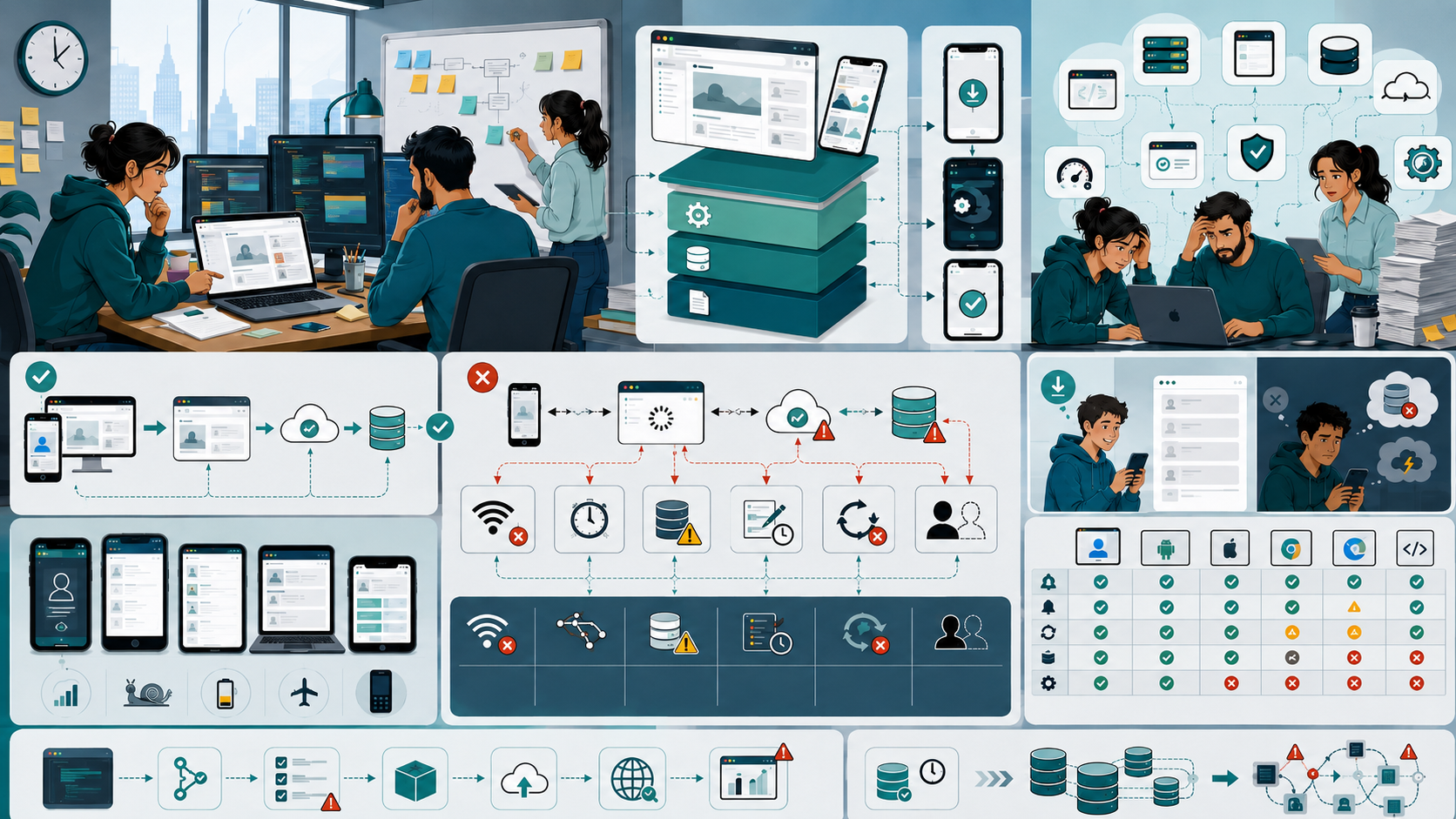
I’ve seen small product teams build a responsive web application, add a service worker, enable caching, configure a manifest, and call it a PWA. The application works well during development. Then real users arrive with unreliable connectivity, older mobile devices, different browsers, slow networks, and interrupted sessions.
That is when the problems become visible.
The biggest mistake is treating Progressive Web App development as a frontend implementation rather than an application architecture decision. A PWA depends on the interaction between the frontend, backend, browser, network, caching strategy, API layer, security model, and deployment workflow.
For startups and small engineering teams, getting those boundaries wrong can create more maintenance work than expected.
Why This Problem Happens in Real Teams
Most PWA problems don't begin with bad code. They usually begin with reasonable decisions made under pressure.
A startup wants to launch quickly. Developers already have a web application. The product team asks for a mobile-friendly experience. Instead of building separate native applications, the team decides to turn the existing application into a Progressive Web App.
The decision itself isn't necessarily wrong.
The problem is assuming that responsive design plus a service worker automatically creates a reliable application experience.
Several factors usually contribute to the problem.
Limited engineering resources
A small team may have only two or three developers working across the frontend, backend, database, testing, deployment, and product requirements.
There isn't always time to design an offline strategy properly.
Developers may implement basic caching and move on to the next feature. That works until users expect the application to behave correctly when connectivity disappears.
Startup deadlines
Early products prioritize functionality over architecture.
That's normal.
The team needs authentication, payments, dashboards, APIs, notifications, analytics, and other functionality before worrying about edge cases.
The problem occurs when temporary implementation decisions become permanent infrastructure.
Incorrect assumptions about offline behavior
Offline functionality is one of the most misunderstood parts of PWA development.
A cached page isn't the same thing as an offline application.
If the interface loads while the API is unavailable but the application cannot retrieve or update meaningful data, the user experience is still broken.
Overlooking browser differences
A PWA operates through browser technology.
That means compatibility matters.
Features available in one browser or operating system may behave differently somewhere else. Installation, notifications, background synchronization, storage, and other capabilities need to be tested against the actual devices used by customers.
Architecture designed only for the happy path
Many applications are designed around this assumption:
User → Browser → API → Database → Response
A reliable PWA needs to consider what happens when one part of that chain is unavailable.
What happens when the network disappears?
What happens when an API request is interrupted?
What happens when cached information is outdated?
What happens when the user submits something while offline?
Those questions should be answered before production problems force the team to answer them.
Where Most Teams Make the Wrong Decision
The most common mistake I see is adding PWA functionality at the end of development.
The application is already built. The team then adds a service worker, manifest, caching, installation support, and notifications.
Technically, this can work.
Architecturally, it can create problems.
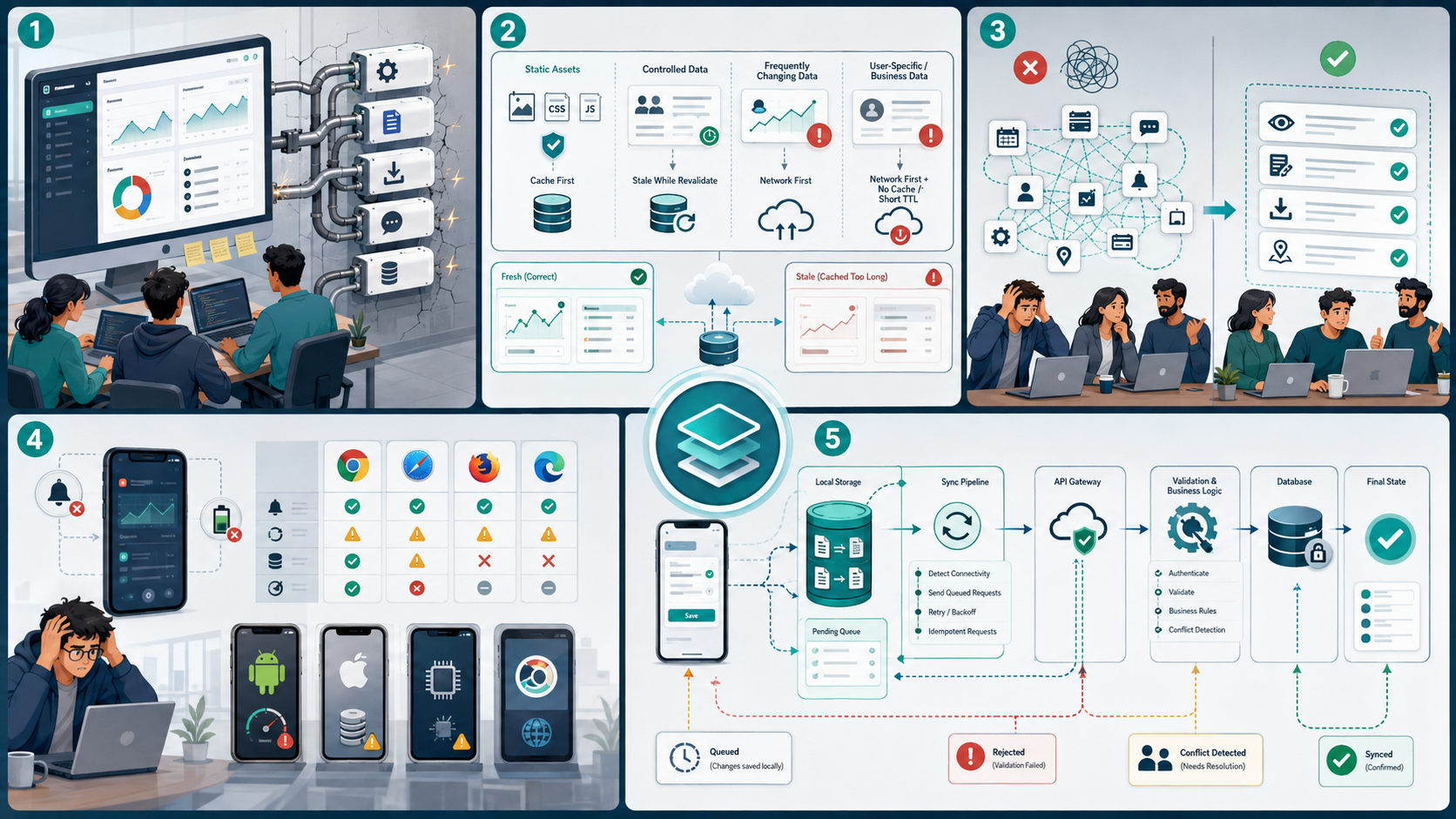
Mistake 1: Treating caching as an afterthought
Caching isn't simply about making the application faster.
It affects data correctness.
Imagine a SaaS dashboard displaying customer information. A developer decides to aggressively cache API responses to improve performance.
The application becomes faster.
But now a user may see outdated customer data.
For static assets, aggressive caching can be perfectly reasonable. For frequently changing business data, the strategy needs much more care.
A useful distinction is:
- Static assets can often use long-lived caching.
- User-specific data needs controlled caching.
- Frequently changing data may require network-first behavior.
- Critical information should have a clear freshness strategy.
The caching decision should follow the data's business importance rather than simply the desire for speed.
Mistake 2: Assuming offline means fully functional
A PWA doesn't need to make every feature available offline.
Trying to do that can actually make the architecture unnecessarily complicated.
Instead, identify the operations that genuinely benefit from offline access.
For example:
A field-service application might allow technicians to view previously synchronized customer information while offline. A sales application might allow users to review recently accessed records. A content application might allow previously viewed content to remain available.
Not every API operation needs to work without connectivity.
The goal is controlled resilience, not pretending the network doesn't exist.
Mistake 3: Copying native-app behavior without understanding the platform
A PWA can provide an app-like experience, but it isn't automatically equivalent to a native application.
Browser capabilities, operating-system restrictions, storage behavior, notification support, and background execution can vary.
I've seen teams design a product around a background process that looked reliable during development but became inconsistent on certain devices.
The lesson is simple:
Design around capabilities you can depend on, not capabilities you hope every browser will provide.
Mistake 4: Ignoring the backend
PWA development is often described as a frontend project.
That's misleading.
If the application relies heavily on APIs, the backend becomes part of the offline and synchronization architecture.
For example, suppose a user edits information while offline.
The frontend now needs to determine:
- Whether the change can be stored locally.
- How the change is queued.
- When synchronization occurs.
- What happens if the API rejects it.
- How conflicting changes are handled.
- How the interface communicates the final state.
That requires coordination between the frontend, backend, API, database, and application logic.
Read More:
Custom Software Development Cost In USA
Practical Fixes That Actually Work
The best PWA architecture I've worked with isn't necessarily the most sophisticated one. Working with a USA software engineering partner for progressive web apps helps teams plan frontend architecture, backend APIs, service workers, caching rules, offline behavior, synchronization, security, testing, and deployment before real users expose production issues.
It is the one where every failure mode has an intentional answer.
1. Separate static assets from business data
Start by categorizing what your application stores.
Static resources:
- JavaScript
- CSS
- Images
- Fonts
- Application shell
Dynamic resources:
- User profiles
- Orders
- Messages
- Dashboard information
- Inventory
- Transactions
These shouldn't automatically use the same caching strategy.
Static resources usually benefit from aggressive caching.
Dynamic data requires freshness rules.
That separation makes the architecture easier to reason about and maintain.
2. Design the service worker around actual application behavior
A service worker isn't just a checkbox for PWA compliance.
It becomes part of the application's infrastructure.
Before implementing one, decide:
- What should be cached?
- When should cached data expire?
- What happens during an API failure?
- How should new application versions be deployed?
- How should old cached resources be removed?
- What happens when users return after several weeks?
Versioning is particularly important.
I've seen deployments where the server had the latest frontend while some users continued receiving older cached resources. The result was inconsistent behavior that was difficult to reproduce.
3. Keep offline storage intentional
Offline storage should have a clear purpose.
Don't store everything simply because the browser provides storage capabilities.
Decide:
- Which data is safe to store?
- How long should it remain available?
- Is it sensitive?
- What happens when the user logs out?
- How much storage can the application reasonably use?
- How will stale records be identified?
Security becomes especially important when storing customer or enterprise information locally.
HTTPS is essential, but transport security alone doesn't solve every local-storage problem.
4. Build synchronization as a business process
Background synchronization sounds simple until real-world conflicts appear.
Suppose two users modify the same record while one of them is temporarily offline.
When synchronization happens, which version wins?
There isn't one universal answer.
Depending on the application, you may need:
- Timestamp-based resolution
- Server-authoritative updates
- Version numbers
- Conflict detection
- Manual resolution
- Operation queues
The correct solution depends on the business functionality.
For a simple application, a basic queue may be enough.
For an enterprise application with shared records, you may need much stronger synchronization rules.
5. Test connectivity instead of only testing screens
Traditional frontend testing often focuses on whether the interface behaves correctly.
PWA testing needs additional scenarios.
Test:
- Fast network
- Slow network
- No network
- Network interruption during an API request
- Application reload while offline
- Outdated cached resources
- Expired authentication
- Failed synchronization
- Multiple browser environments
- Different screen sizes
- Older mobile hardware
One of the most useful tests is simply turning the network off during a real workflow.
You'll quickly discover assumptions that aren't visible during normal development.
6. Keep the architecture simple until complexity is justified
Small teams don't need to introduce complicated infrastructure just because a PWA is being built.
A modular application with a clean frontend, well-defined API layer, reliable database, controlled caching, and straightforward deployment can handle significant traffic.
The architecture should evolve with actual requirements.
Don't introduce unnecessary infrastructure because another company operates at a completely different scale.

When This Approach Fails
A relatively simple PWA architecture isn't suitable for every product.
There are situations where a PWA may not provide the capabilities your application requires.
For example, products that depend heavily on platform-specific hardware, advanced background processing, deep operating-system integration, or specialized device capabilities may need native development.
There are also limitations around browser compatibility and platform behavior.
The decision should therefore be based on the application's requirements rather than the popularity of PWAs.
A PWA can be an excellent platform for:
- SaaS dashboards
- E-commerce applications
- Internal business systems
- Customer portals
- Content platforms
- Booking systems
- Field applications
- Productivity applications
But that doesn't mean every application should become a PWA.
Complexity can also become a maintenance problem
Adding offline storage, synchronization, caching, notifications, installation, and service workers increases the number of application states.
A simple online application might have one primary state:
Connected → Request → Response
A resilient offline application could have:
Connected → Request → Failed → Store Locally → Retry → Synchronize → Conflict → Resolve
Every additional state needs testing and maintenance.
For a small development team, that complexity has a real cost.

Sustainable Practices for Small Engineering Teams
The long-term success of a PWA depends less on individual features and more on engineering discipline.
Document the caching strategy
Don't leave caching behavior buried inside service-worker code.
Document:
- What gets cached
- Why it gets cached
- How long it remains valid
- What happens during updates
- What happens when data becomes stale
This saves time when another developer joins the project.
Keep deployment predictable
A PWA can be affected by cached resources, so deployment workflows need to account for application versions.
A reliable deployment process should make it clear:
- Which version is currently deployed
- Which assets belong to that version
- How old caches are handled
- How rollback works
Monitor real-world failures
Performance monitoring shouldn't stop at page-load speed.
Look at:
- Failed API requests
- JavaScript errors
- Synchronization failures
- Installation behavior
- Offline errors
- Browser compatibility issues
- Slow network performance
Real users often reveal problems that development environments never reproduce.
Avoid unnecessary features
Not every PWA needs:
- Complex offline editing
- Background synchronization
- Push notifications
- Extensive local databases
- Complicated caching layers
Every feature creates additional functionality, testing requirements, and maintenance.
Implement the capabilities that solve an actual user problem.
The Real Engineering Lesson
The strongest Progressive Web App isn't the one with the largest feature list.
It's the one that behaves predictably when conditions aren't perfect.
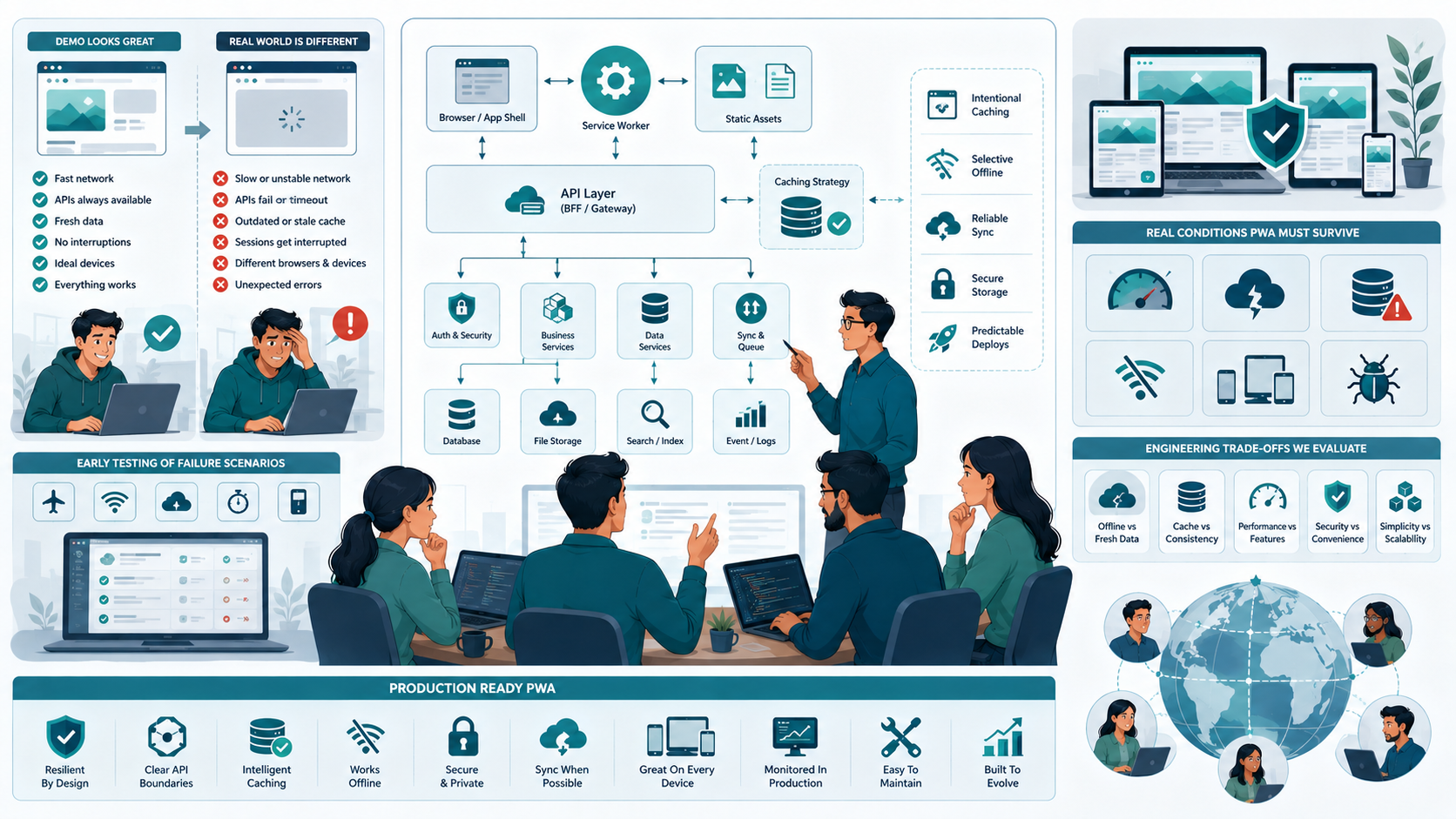
A good PWA should still provide a reasonable experience when the network becomes slow, an API temporarily fails, cached information becomes outdated, or a user opens the application on a device the development team didn't use every day.
For startups and small engineering teams, simplicity is often the biggest advantage.
Start with a clean application architecture. Define the API boundaries. Separate static resources from dynamic data. Introduce caching intentionally. Add offline functionality only where it creates real value. Test failure scenarios early.
That's usually a better approach than trying to make a web application behave exactly like a native application from day one.
When evaluating a Progressive Web App development company in the USA, the technical question shouldn't simply be whether the team can build a PWA.
The more important question is whether they understand the engineering trade-offs behind browser-based applications, offline behavior, service workers, API integration, security, performance, scalability, and long-term maintenance.
That's where the difference between a PWA that demos well and one that survives production usually appears.
Conclusion
Progressive Web App development is not difficult because of the service worker, manifest, or installation process. The real challenge is designing an application that continues to behave predictably when the network, browser, API, or cached data doesn't behave as expected.
For small teams, the best approach is usually to keep the architecture simple, separate static and dynamic data, define caching rules carefully, and introduce offline functionality only where it provides genuine value. Synchronization, security, testing, and deployment also need to be treated as part of the application architecture rather than added after launch.
The biggest lesson is that a PWA should be designed around real user conditions, not an ideal development environment. When teams focus on reliability, maintainability, and clear technical trade-offs, they can build a web application that feels fast and app-like without creating unnecessary engineering complexity.
Progressive Web App Development Company In USA: FAQs
Yes, when the product primarily needs a reliable web-based experience across mobile and desktop devices. A PWA can reduce the need to maintain separate application codebases, but platform-specific requirements should be evaluated before choosing it.
It can, but offline capability depends on how the application is designed. Cached resources can remain available without connectivity, while offline data creation and synchronization require additional application logic.
Service workers are a core part of the traditional PWA architecture because they enable capabilities such as offline resource handling, caching, and certain background behaviors. Their implementation should be based on actual application requirements.
Yes. A PWA can support enterprise use cases, but scalability depends on the complete architecture, including the frontend, API, database, infrastructure, security, caching, monitoring, and deployment systems.
The biggest mistake is treating PWA development as a collection of frontend features rather than an architectural decision. Caching, offline behavior, synchronization, security, and deployment need to be considered together from the beginning.
Reference
Written by

Paras Dabhi
VerifiedFull-Stack Developer (Python/Django, React, Node.js)
I build scalable web apps and SaaS products with Django REST, React/Next.js, and Node.js — clean architecture, performance, and production-ready delivery.
LinkedIn